Pre-Read:Hyperf/Crontab Documents Pre-Read:Hyperf/Process Custom Process Documents Pre-Read:Hyperf Event System
Introduction
Previously, while working on a project, I used the Hyperf/Crontab component for second-level data cleansing. Recently, as I’ve been working on splitting scheduled tasks, I decided to go through the component source code to deepen my understanding and, at the same time, contemplate how to build a task scheduling feature based on Hyperf/Crontab. At its core, Crontab is a custom process that starts with the Server, so we will introduce it in two stages: startup and execution.
Timer Startup
Given that Crontab is a process that starts with the Server, analyzing its lifecycle will inevitably involve the framework’s startup. However, this article is not mainly about introducing the Hyperf framework startup source code, so we will briefly go over the framework startup code that involves the launch of custom processes.
When we start Hyperf using the command php bin/hyperf.php start,
$application = $container->get(\Hyperf\Contract\ApplicationInterface::class);
In the entry file hyperf.php, the framework will instantiate a Hyperf\Framework\ApplicationFactory instance and will scan all places annotated with @Command or defined with commands configuration, instantiating a Symfony\Component\Console\Application object (this is a Symfony Console command class used to define commands and trigger execution tasks). All the classes defined as command objects are registered into the $application object. Finally, in the entry file, it executes:
$application->run();
It executes all the Command commands, including the Hyperf\Server\Command\StartServer service Server startup class. This class defines that if the received command parameters include start, then it will execute its logic, i.e., instantiate the Hyperf\Server\Server class according to the configuration in config/autoload/server.php. During this process, the BeforeMainServerStart event is triggered, and here we are about to enter the core stage of custom process startup.
$serverProcesses = $serverConfig['processes'] ?? [];
        $processes = $this->config->get('processes', []);
        $annotationProcesses = $this->getAnnotationProcesses();
        // Retrieve the processes have been registered.
        $processes = array_merge($serverProcesses, $processes, ProcessManager::all(), array_keys($annotationProcesses));
        foreach ($processes as $process) {
            ...
            if ($instance instanceof ProcessInterface) {
                $instance->isEnable() && $instance->bind($server);
            }
        }
The BootProcessListener listens for the trigger of the BeforeMainServerStart event and will retrieve all process classes annotated with @Process and defined in the processes configuration file, executing their isEnable and bind methods.
Timer Execution
Above, we briefly introduced how custom processes start with the framework. Now, let’s analyze the main character of this article, the Crontab custom process.
According to the Hyperf documentation, before using Crontab, we need to register the Hyperf\Crontab\Process\CrontabDispatcherProcess custom process in config/autoload/processes.php. So let’s directly examine what this process class does.
If you’re familiar with the Hyperf/Process component, you’d know that the primary logic of a process class is executed within the handle() method.
public function handle(): void
    {
        $this->event->dispatch(new CrontabDispatcherStarted());
        while (true) {
            $this->sleep();
            $crontabs = $this->scheduler->schedule();
            while (! $crontabs->isEmpty()) {
                $crontab = $crontabs->dequeue();
                $this->strategy->dispatch($crontab);
            }
        }
    }
Inside the handle method, it first triggers a CrontabDispatcherStarted event, which currently has no listeners. Following that, there’s a period of coroutine blocking; the first block duration is the number of seconds until the next whole minute, and the rest are 60 seconds each. The reason for using \Swoole\Coroutine::sleep instead of plain sleep() is because a custom process is by default a coroutine server.
Next,
$crontabs = $this->scheduler->schedule();
The method returns an SplQueue queue of Crontab objects that are scheduled to be executed in the current minute. An SplQueue is a doubly linked list that can be used as a queue in PHP, and it is part of the Standard PHP Library (SPL).
object(Hyperf\Crontab\Crontab)#46164 (10) {
  ["name":protected]=>
  string(4) "Foo4"
  ["type":protected]=>
  string(8) "callback"
  ["rule":protected]=>
  string(11) "* * * * * *"
  ["singleton":protected]=>
  bool(false)
  ["mutexPool":protected]=>
  string(7) "default"
  ["mutexExpires":protected]=>
  int(3600)
  ["onOneServer":protected]=>
  bool(true)
  ["callback":protected]=>
  array(2) {
[DEBUG] Event Hyperf\Framework\Event\OnPipeMessage handled by Hyperf\Crontab\Listener\OnPipeMessageListener listener.
    [0]=>
    string(16) "App\Task\FooTask"
    [1]=>
    string(7) "execute"
  }
  ["memo":protected]=>
  NULL
  ["executeTime":protected]=>
  object(Carbon\Carbon)#46106 (3) {
    ["date"]=>
    string(26) "2020-06-02 14:15:57.000000"
    ["timezone_type"]=>
    int(3)
    ["timezone"]=>
    string(13) "Asia/Shanghai"
  }
}
The Crontab object contains crucial information that is particularly relevant for the execution of scheduled tasks:
- Execution Callback
- Execution Time
Regarding how the Crontab object is generated, this will be explained later.
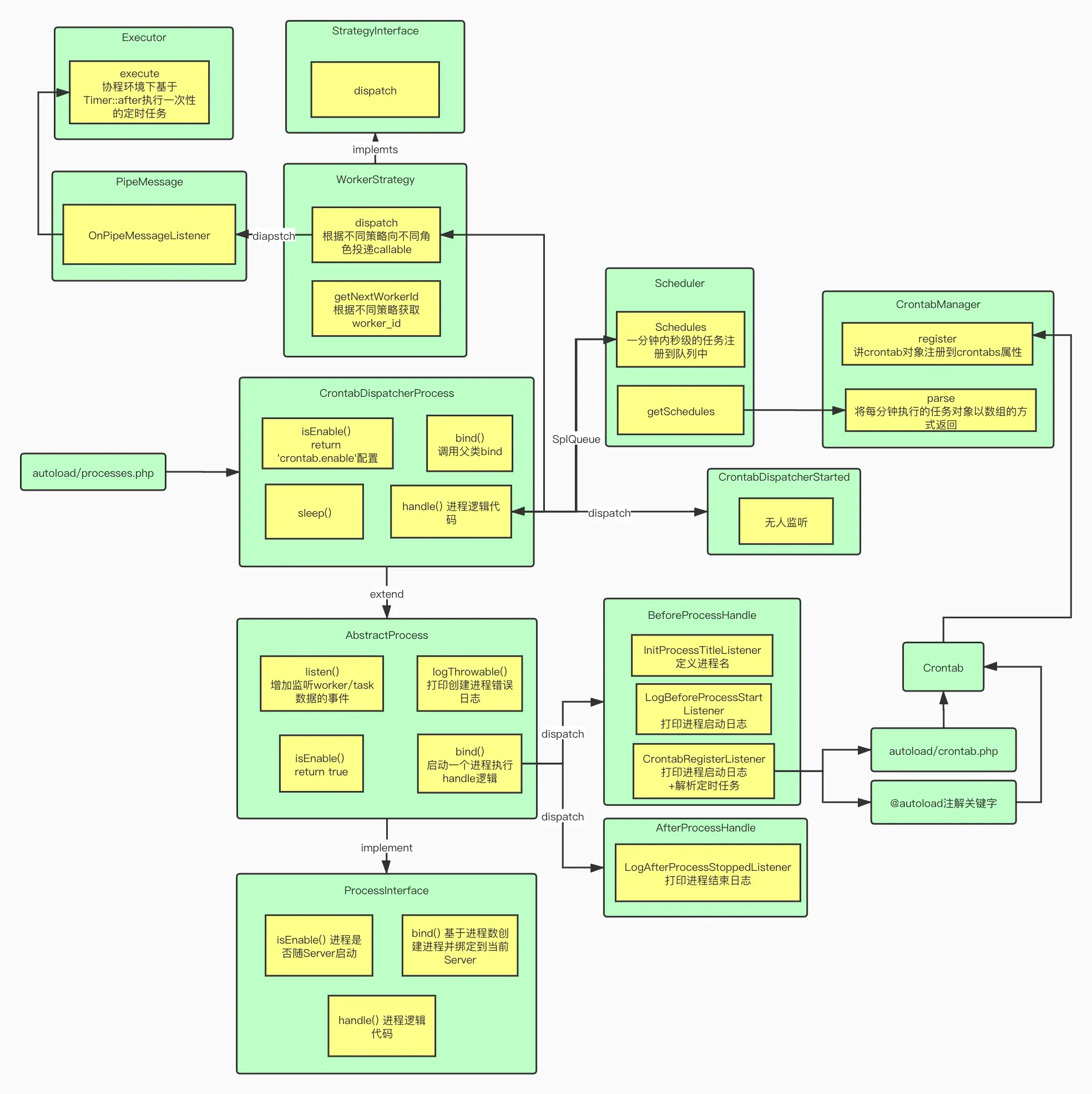
Once the Crontab object is obtained, it is sent to the implementation class of StrategyInterface that is defined in config/autoload/dependencies.php to be dispatched. By default, the strategy specified is to execute the task in a Worker process.
The StrategyInterface is responsible for determining how the cron job should be executed. The default implementation, which uses Worker processes, ensures that the cron jobs are handled by the available Worker processes in the server. This allows for efficient execution of scheduled tasks without blocking the main server process.
$server = $this->serverFactory->getServer()->getServer();
        if ($server instanceof Server && $crontab->getExecuteTime() instanceof Carbon) {
            $workerId = $this->getNextWorkerId($server);
            $server->sendMessage(new PipeMessage(
                'callback',
                [Executor::class, 'execute'],
                $crontab
            ), $workerId);
        }
Aside from the Coroutine strategy, the dispatch method for the other strategies is similar - they all involve round-robin polling of Worker IDs to send a PipeMessage object via the sendMessage method. Additionally, the sendMessage method triggers the OnPipeMessage event. This event is listened to by the OnPipeMessageListener, which will execute the corresponding callback function based on the PipeMessage.
The callback function is the Executor->execute method. Within this method, a Swoole\Timer::after is defined based on the attributes of the Crontab object. The timer is set to execute the callback after a certain number of seconds, as defined by the executeTime property of the Crontab.
This setup allows for the deferred execution of tasks, where the PipeMessage sent to the Worker process tells it to wait for the specified time before executing the task. The use of Swoole’s Timer::after ensures that the callback is executed after the delay, without blocking the process that set up the timer.
This approach allows for efficient task scheduling and execution in an asynchronous, non-blocking manner, making use of the multi-process capabilities of Swoole to handle concurrent tasks across different Worker processes.
$callback && Timer::after($diff > 0 ? $diff * 1000 : 1, $callback);
This essentially completes the execution of a second-level precision scheduled task.
Now let’s return to the question of when the Crontab object is generated. We mentioned earlier that Crontab is essentially a custom process. According to the usage instructions of Hyperf/Process, all custom processes extend the Hyperf\Process\AbstractProcess. This class triggers the BeforeProcessHandle event when starting a SwooleProcess. During this event, it scans all the crontab configurations and annotations, parses these annotations to generate Crontab objects, and stores them in the crontabs property.
public function register(Crontab $crontab): bool
    {
        if (! $this->isValidCrontab($crontab)) {
            return false;
        }
        $this->crontabs[$crontab->getName()] = $crontab;
        return true;
    }
The above is roughly the execution process of a crontab scheduled task. Of course, there are many execution details and individualized definition parameters for Contab that we haven’t had the chance to introduce due to space limitations. Interested readers can study these in their own time. Below, I will also attach a diagram of the overall execution process and the relationships between the classes in Hyperf/Crontab, to facilitate reading the source code.